
Annotate Runtime Metrics with Events
Try It Live
Send events with the Getting Started demo stack and watch annotations appear on a metrics timeline in real time. No code required.
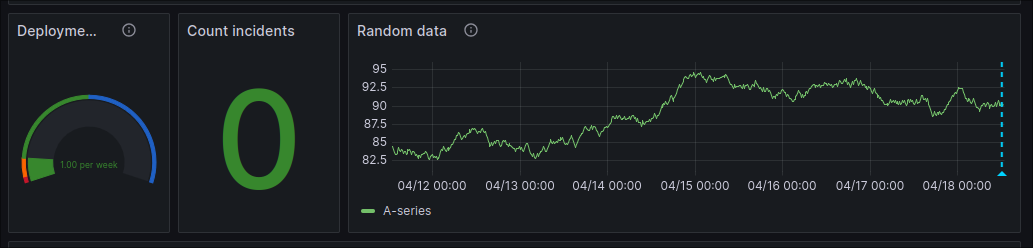
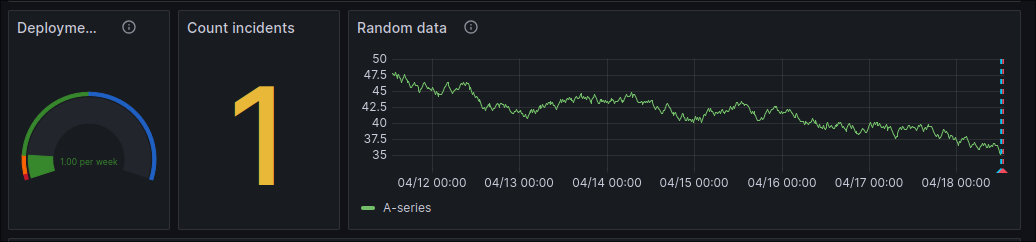
CDEvents stored in the event store aren't limited to CDviz's own dashboards. Any Grafana time series panel can show the same deployment and incident markers: CPU, latency, error rate, or whatever your Prometheus/Datadog/CloudWatch datasource already renders. A spike is then explained by "yes, we deployed at 14:02" instead of a guess.
How It Works
Grafana annotation queries run a query that returns rows with a time, title, text, and tags, then plot each row as a vertical marker on every time series panel in the dashboard. Point one at your cdviz-db PostgreSQL datasource and query cdviz.cdevents_lake directly. You need no extra service and no polling job.
Example: Annotate with Service Deployments
Add an annotation query with this SQL, mapping time/title/text/tags to the matching columns:
SELECT
  timestamp as time,
  payload -> 'subject' ->> 'id' as title,
  array_to_string(
    ARRAY[
      'event:' || subject || '.' || predicate,
      'environment:' || (payload -> 'subject' -> 'content' -> 'environment' ->> 'id'),
      'service:' || (payload -> 'subject' ->> 'id')
    ], ','
  ) as tags,
  payload -> 'subject' -> 'content' ->> 'artifactId' as text
FROM cdviz.cdevents_lake
WHERE $__timeFilter(timestamp)
  AND subject = 'service' AND predicate IN ('deployed', 'upgraded', 'rolledback')
Example: Annotate with Incidents
SELECT
  timestamp as time,
  payload -> 'subject' ->> 'id' as title,
  array_to_string(
    ARRAY[
      'event:' || subject || '.' || predicate,
      'environment:' || (payload -> 'subject' -> 'content' -> 'environment' ->> 'id'),
      'service:' || (payload -> 'subject' -> 'content' -> 'service' ->> 'id')
    ], ','
  ) as tags,
  payload -> 'subject' -> 'content' ->> 'ticketURI' as text
FROM cdviz.cdevents_lake
WHERE $__timeFilter(timestamp)
  AND subject = 'incident' AND predicate IN ('detected', 'reported')
Add It to Your Own Dashboard
- Open your dashboard's settings → Annotations → New query.
- Set the datasource to your
cdviz-dbPostgreSQL connection. - Paste one of the queries above (or both, as separate annotation layers with different colors).
- Under Mappings, map
time→ time,title→ title,text→ text,tags→ tags. - Optionally filter by
${environment}/${service}dashboard variables to scope annotations to what the panel is actually showing.
Source Code Reference
- Reference implementation: demo_service_deployed.json: a playground dashboard with both annotation queries wired up, plus forms to send test events.